
Best AI Tools for Background Removal and Vector Conversion in 2026
Disclosure: This article may contain affiliate links. If you buy through them, we may earn a commission at no extra cost to you.
If you work with product photos, logos, print files, marketing graphics, stickers, labels, or digital artwork, you usually face two common problems. First, you need background removal that looks clean and professional. Second, you may need vector conversion so the final file can scale sharply for print, signage, packaging, or production.
That is why many creators, eCommerce sellers, designers, and small businesses end up using more than one tool in the same workflow. Some tools are better for removing backgrounds, while others are designed for converting raster images into scalable vector files.
In this guide, we will look at four strong options that fit naturally into the same workflow: Clipping Magic, Pixian.AI, Vector Magic, and Vectorizer.AI.
Why Background Removal and Vector Conversion Often Go Together
A lot of people treat background removal and vector conversion as completely separate tasks, but in real-world projects they often belong to the same workflow.
For example, an online seller may need to remove the background from a product image before uploading it to a marketplace. A business owner may want to isolate a logo from an existing image and then convert it into a vector format for large-format printing. A crafter may want to clean up a design and then prepare it for cutting or engraving.
That is why a smarter workflow often looks like this: remove the unwanted background first, refine the image, and then convert it into a vector format if the final asset needs to scale cleanly.
Clipping Magic for Precise Background Removal
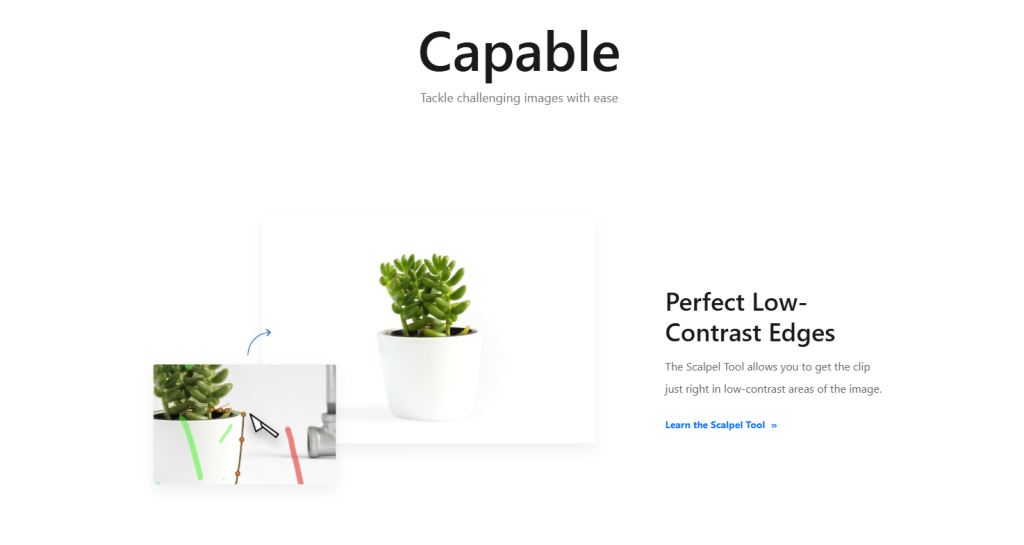
Clipping Magic is one of the strongest options when your main goal is precise background removal with more editing control.
What makes it useful is that it is not just a one-click background remover. It also gives you extra control for edge cleanup, hair details, and fine adjustments. That matters because automatic cutouts are not always enough for difficult images such as soft edges, shadows, transparent objects, or complex product photos.
If you sell products online or work with marketing visuals, Clipping Magic is a strong option when you want a cleaner transparent background instead of a rough AI cutout.
Try Clipping Magic if you want more control over background cleanup and polished results for product photos or marketing images.
Pixian.AI for Fast and Budget-Friendly Background Removal
Pixian.AI is another strong choice for background removal, especially if you care about speed, simplicity, and a lighter workflow.
It is a practical option for users who want quick results for product photos, profile images, marketplace uploads, social graphics, or routine image cleanup. It can also make sense for businesses or developers who want a more API-friendly solution.
If your goal is fast and practical background removal without overcomplicating the process, Pixian.AI is worth considering.
Try Pixian.AI if you want a fast and simple option for everyday background removal tasks.

Vector Magic for Professional Vector Conversion
Vector Magic is designed for users who need professional vector conversion rather than simple photo editing.
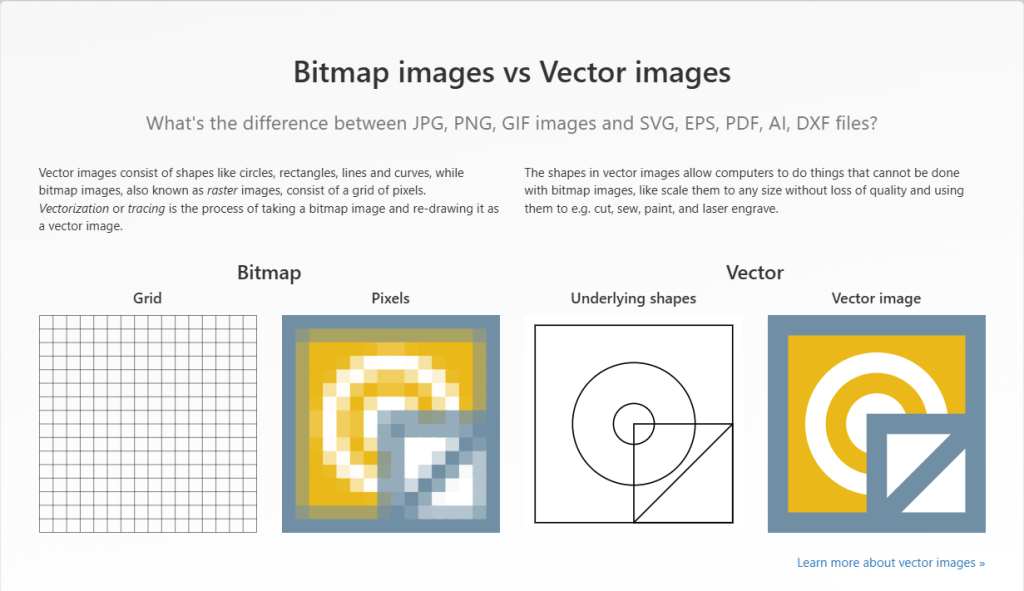
This matters because raster images such as JPG or PNG files often lose quality when enlarged, while vector files can scale much more cleanly. That makes Vector Magic highly relevant for logos, print graphics, signage, packaging, promotional materials, and reusable brand assets.
If your project involves preparing artwork for production, print, or design handoff, Vector Magic is one of the more relevant tools in this group.
Try Vector Magic if you need scalable artwork for logos, print files, or professional production workflows.
Vectorizer.AI for Modern AI Vectorization
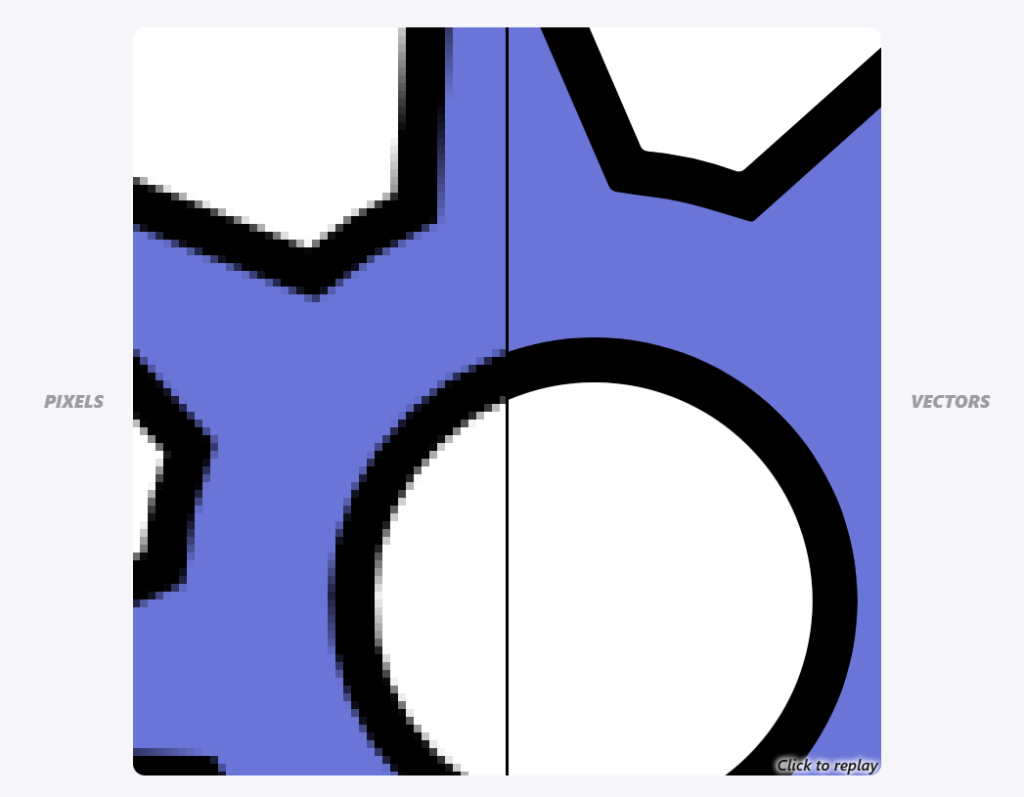
Vectorizer.AI is a strong option for users who want a more modern, AI-driven approach to vector conversion.
It is especially useful when you start with ordinary bitmap files and want to convert them into cleaner vector-style outputs for design, digital production, or scalable use. It can be relevant for icons, illustrations, logos, and other graphic assets that need sharper scalability.
For users who prefer an AI-first workflow instead of a more traditional conversion process, Vectorizer.AI is an easy tool to consider.
Try Vectorizer.AI if you want an AI-based way to turn bitmap graphics into scalable vector output.
Which Tool Is Best for Your Use Case
Best for background removal
If your main goal is removing backgrounds from product photos, ad creatives, profile images, or marketplace listings, Clipping Magic and Pixian.AI are the most relevant choices.
Best for vector conversion
If your main goal is converting logos, illustrations, or image assets into scalable files for print or production, Vector Magic and Vectorizer.AI are the more relevant options.
Best overall workflow
If you need both cleanup and scalability, the smartest move is often to combine the two categories: use a background remover first, then use a vector conversion tool if the final file needs to scale cleanly.
A Practical Workflow That Actually Makes Sense
A simple workflow can save a lot of time.
Step one: remove the background from the original image.
Step two: review the cleaned result and fix any edge issues.
Step three: if the final asset needs to be enlarged, printed, cut, or reused professionally, convert it into a vector format.
In practical terms, that often means using Clipping Magic or Pixian.AI for the cleanup phase, then using Vector Magic or Vectorizer.AI for the vector phase.
Final Verdict
If you want one simple answer, here it is.
Clipping Magic is a strong choice when you want more control and precision for background removal.
Pixian.AI is a smart option when you want a fast and practical solution for everyday cleanup.
Vector Magic is a strong fit when your priority is professional vector conversion for print, branding, or production.
Vectorizer.AI is a great option when you want a modern AI-based approach to vectorizing bitmap images.
The best overall strategy is not choosing only one of them. It is choosing the right tool for the right stage of your workflow.
Frequently Asked Questions
What is the difference between background removal and vector conversion?
Background removal isolates the subject from the rest of the image, usually to create a transparent background. Vector conversion turns a raster image into scalable geometric shapes that can be resized more cleanly.
Which tool should I use for product photos?
For product photos, Clipping Magic and Pixian.AI are usually the most relevant choices because they focus on background removal and cleanup.
Which tool should I use for logos and print files?
For logos, print graphics, and scalable artwork, Vector Magic and Vectorizer.AI are usually the more relevant options because they focus on vector conversion.
Can I use more than one tool in the same workflow?
Yes. In many cases, the best workflow is to remove the background first and then convert the image into a vector format if you need scalable output.
Related Articles:
Zapmail Review 2026: Is It Worth It for Cold Email Outreach?
Collov AI Review (2025): Honest Experience With the AI Interior Design Tool
Cloudways Review 2025 – Honest Look at Managed Cloud Hosting